
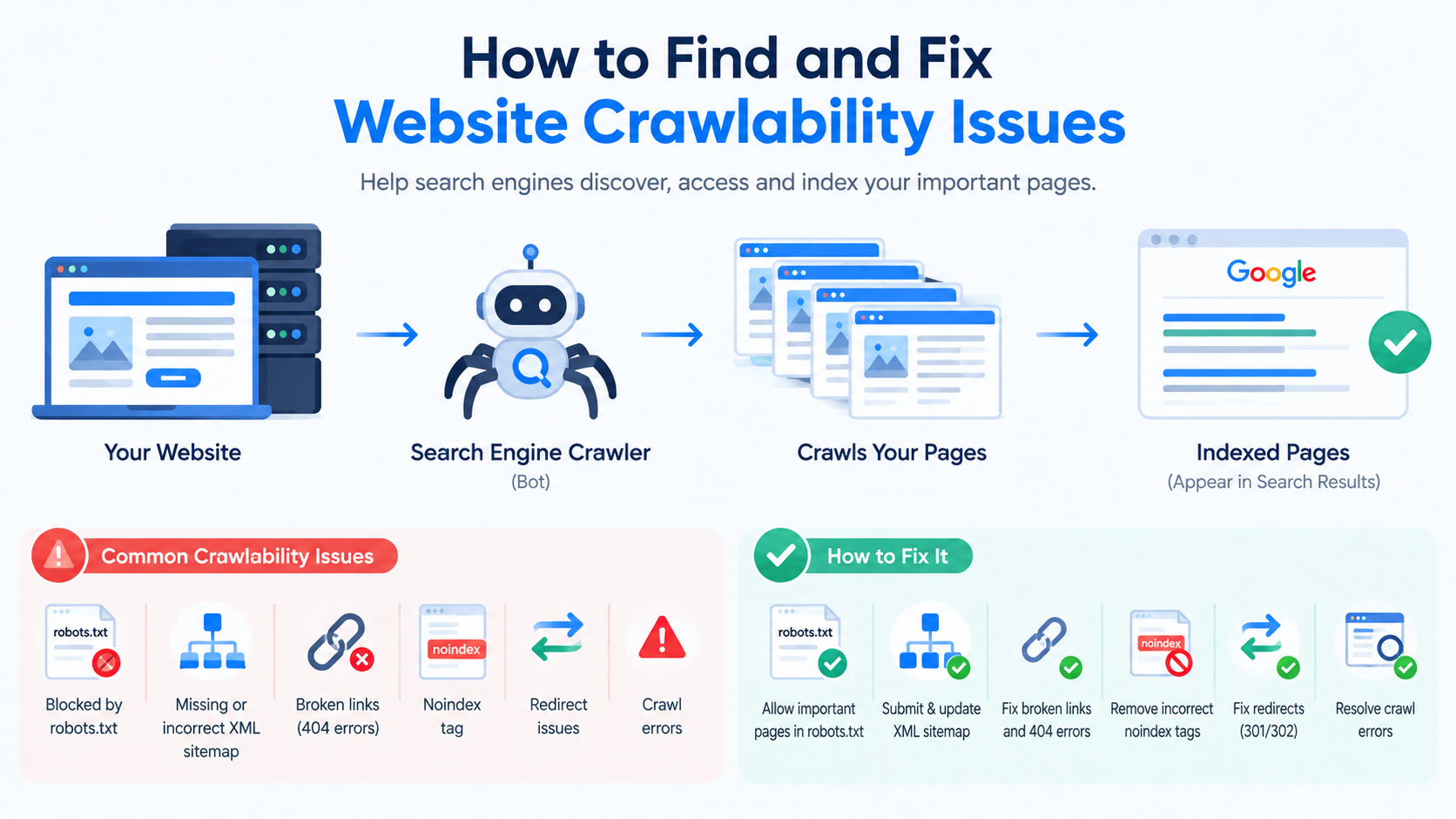
Search engines need to crawl your website before they can properly understand and index its pages. If search engine crawlers cannot access pages your website may struggle to appear in search results even if the content is useful and well-written.
Crawlability issues are often caused by SEO problems such as incorrect robots.txt rules, broken links, server errors, poor site architecture or unnecessary redirects.
The good news is that most crawlability problems can be identified through a website audit and fixed with the right technical changes.
What Is Website Crawlability?
Website crawlability refers to how search engine bots can discover and access the pages on your website.
Google uses automated crawlers, such as Googlebot to discover URLs and analyze website content. If a page is difficult or impossible for crawlers to reach search engines may not discover it efficiently.
Crawlability is different from indexability. A page may be crawlable. Still not appear in search results because of an indexing issue.
For example:
Crawlability: Can Google access the page?
Indexability: Can Google include the page in its search index?
Ranking: How well does the page perform in search results?
Understanding this difference makes it easier to diagnose SEO problems.
Common Website Crawlability Issues
Several technical problems can prevent search engines from crawling a website.
- Incorrect Robots.txt Rules
The robots.txt file tells search engine crawlers which areas of a website they should or should not access.
An configured file can accidentally block important pages.
For example a rule such as:
User-agent: *
Disallow: /
can prevent crawlers from accessing the website.
Your robots.txt file should be reviewed carefully whenever major website changes are made.
- Broken Internal Links
Search engines discover pages by following links.
If important pages have broken links crawlers may have difficulty reaching them.
Common causes include:
Deleted pages
Incorrect URLs
Website migrations
Typing errors
Changes to URL structures
A website audit can identify links and help you prioritize the ones affecting important pages.
- Server Errors
Server errors can prevent crawlers from accessing pages.
Common examples include errors, such as:
500 Internal Server Error
502 Bad Gateway
503 Service Unavailable
Occasional server errors may not create a major problem but persistent errors on important pages can interfere with crawling and user access.
- Website Architecture
A complicated website structure can make it difficult for search engines and users to discover important content.
For example an important service page that is buried clicks deep from the homepage may receive less attention than a page that is easy to reach through clear navigation and internal links.
A logical structure might look like:
Homepage → Services → Website Audit Service → Individual Service Information
Keep pages easy to discover and connect related content with relevant internal links.
- Excessive Redirects
Redirects are useful when URLs change but many redirects can create unnecessary crawling complexity.
Common problems include:
Redirect chains
Redirect loops
Incorrect redirect destinations
Multiple redirects between new URLs
During a website audit check whether important URLs resolve efficiently to their final destination.
How to Find Crawlability Problems
You do not need to guess where crawling problems exist. Several tools and techniques can help identify them.
Use Google Search Console
Google Search Console is one of the useful tools for checking how Google interacts with your website.
Review areas such as:
Page indexing reports
Crawl-related information
URL inspection
Sitemap status
Examples of pages Google could not process correctly
The URL Inspection tool can also help you investigate URLs.
Check Your Robots.txt File
Look for rules that may unintentionally restrict sections of your website.
Pay attention after installing SEO plugins redesigning your site or moving your website to a new platform.
Crawl Your Website With an SEO Crawler
A SEO crawler can simulate how search engines discover website pages.
These tools can help identify:
Broken links
Redirect chains
Status-code errors
Blocked URLs
Duplicate URLs
Missing internal links
Canonical problems
Crawl depth
For websites automated crawling can save significant time during a technical website audit.
Review Your XML Sitemap
An XML sitemap helps search engines discover URLs.
Make sure the sitemap contains:
Important indexable pages
Correct canonical URLs
Working URLs
Current versions of pages
Avoid filling your sitemap with URLs that return errors redirect elsewhere or should not be indexed.
How to Fix Website Crawlability Issues
Once you identify crawlability problems address them according to their impact.
Remove Broken Links
Update internal links that point to incorrect URLs.
If a page has been permanently removed, decide whether users should be redirected to a replacement page or whether the URL should remain unavailable.
Avoid redirecting every deleted page to the homepage when there is no replacement.
Correct Robots.txt Restrictions
Remove blocking rules that prevent crawlers from accessing important content.
However avoid making robots.txt changes without understanding their effect. Blocking resources and blocking important pages are very different situations.
Improve Internal Linking
Create connections between related pages.
For example an article about SEO could naturally link to your Website Audit Service page when discussing professional technical audits.
This helps users discover services while also creating a clearer site structure.
Resolve Server Problems
If important pages regularly return server errors work with your developer. Hosting provider to identify the underlying problem.
Potential causes may include:
limitations
Server configuration errors
Plugin conflicts
Database problems
Temporary service failures
Technical fixes should address the underlying cause rather than simply hiding the symptoms.
Simplify Redirect Chains
Where possible redirect an URL directly to its final destination.
For example:
URL → Final URL
is generally cleaner than:
Old URL → Temporary URL → Another URL → Final URL
Review redirects whenever you migrate your website or change URL structures.
Crawlability vs. Indexability
These concepts are. Should not be treated as identical.
Imagine a page can be accessed by Googlebot but has a noindex directive.
The page is crawlable. It is intentionally prevented from being indexed.
On the hand if your robots.txt file blocks Google from accessing a page Google may not be able to crawl the page normally.
This is why a complete SEO audit should examine both crawling and indexing than focusing on only one.
How a Website Audit Helps Find Crawlability Issues
A professional website audit combines checks to identify technical problems that may be difficult to notice manually.
A thorough audit can review:
Crawlability
Indexability
Internal links
Robots.txt
XML sitemaps
Redirects
HTTP status codes
Canonical URLs
Website architecture
Mobile accessibility
Page performance
Technical SEO errors
The goal is not simply to produce a list of errors. The useful audit explains which issues matter why they matter and what should be done next.
Crawlability Checklist
Use this checklist when reviewing your website:
Check robots.txt
Review Google Search Console
Test important URLs
Check for broken internal links
Review server response codes
Find redirect chains
Check for redirect loops
Review XML sitemap URLs
Improve internal linking
Check website architecture
Identify orphan pages
Review crawl depth
Check canonical URLs
Monitor major website changes
Re-crawl the website after fixes
When Should You Perform a Crawlability Audit?
A crawlability audit is particularly useful after:
Launching a website
Redesigning a website
Changing URL structures
Migrating to a new domain
Moving to a new CMS
Publishing a large amount of content
Experiencing a sudden traffic decline
Changing robots.txt rules
Making major technical changes
Regular monitoring can also help you discover problems before they affect a large number of pages.
Final Thoughts
Website crawlability is a part of technical SEO. If search engines cannot efficiently discover and access your pages your SEO efforts may not produce their full potential.
Start by checking robots.txt links, server responses, XML sitemaps, redirects and website architecture. Tools such as Google Search Console and SEO crawlers can make the process much easier.
For businesses with technically complex websites a professional Website Audit Service can provide a structured review of crawlability, indexability, performance and other technical SEO factors.
Fixing crawlability problems is not about making your website more complicated. It is about creating a accessible structure that works well for both search engines and visitors.


